Friday, 4 May 2012

Scrapbooking for kids

I heard on the radio today that it is National Scrapbooking Day. Although not a scrapbooker myself, it is something that I have very much enjoyed doing with the children over the years. In my daughter's case we have about ten years worth of scrap stuck down on a month by month basis.

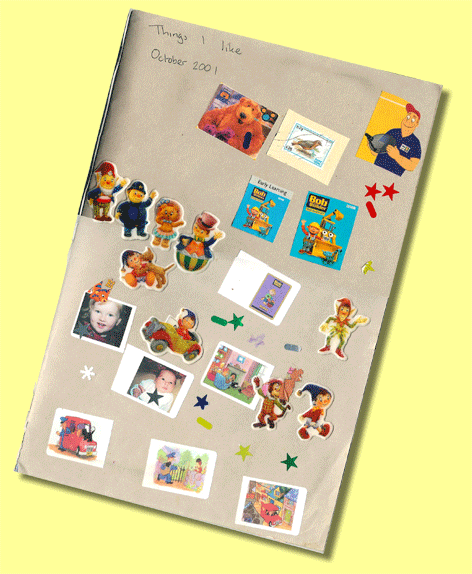
For us, it all started when my daughter was about two. I was queuing to pay my paper bill in the local newsagents when a  cheap scrapbook caught my eye. It was one of those sugar paper books that I remember having as a child. I bought it and we spent the afternoon making a page entitled "Things I like".

There have been many more pages since. My children are now 12 and 10 and scrapbooking sessions have become less frequent,  but one thing they really enjoy is looking back on all the stuff from their early years. Between them they have created wonderful books full of photographs, artwork, diary entries, scribblings and lots more besides. So here are my tips for encouraging young children to engage in this satisfying hobby.


  • Don't get too hung up on the results. Since starting scrapbooks with my children I have discovered there is a whole world of adult scrapbookers out there producing beautiful, coordinated and professional looking pages of memories. For young children, the results don't matter so much, it is the joy of collecting, cutting and pasting that drives them. Let your child develop her own way at first and as she matures introduce more sophisticated ideas if you wish.
  • For very young children start with stickers, as even glue sticks can be difficult to handle. These can be either commercially made stickers or even better home made stickers. Stickers can be made on the computer (using photographs, clipart or things you have scanned) and printed onto sticker paper. Or they can be made in a sticker machine.
  • If your child isn't confident with scissors, cut everything out yourself in advance (children can stick quicker than you can cut) and let them choose what they want to put in.
  • Make use of technology. Create titles in Microsoft Wordart. Find topic relevant clipart. Scan or photograph your child's oversize artwork and reduce it to scrapbook friendly size.
  • Put your digital camera to work. Take pictures of your child's play dough creations, his lego models, his favourite toys, even his grazed knee. Anything they consider important will do. You don't have to print them onto expensive paper for this kind of scrapbooking. And take advantage of the digital camera's immediacy by printing off those pictures of the zoo when you get home so that they are ready to stick in the next day.
  • Save entrance tickets, leaflets, napkins, sweet wrappers; anything that is flat and can be stuck down. And if things aren't flat collect them anyway as you can always photograph them for the scrapbook.
  • Encourage your child to talk about what they are adding and to later write a few words.
  • Make use of wallpaper and fabric samples.
  • Save wrapping paper.
  • Buy glue sticks in large quantities.
  • Introduce a few scrapbooking and card making supplies for special pages like birthdays and christmas. 
  • Use children's stamping kits to make borders and backgrounds.
  • Buy some paper punches in various designs - children can work these by about the age of six.
  • Buy some child size fancy scissors.

Most of all have fun.

Monday, 16 April 2012

Botanical illustration without the drawing

A page from the Observer's book
Out on a cycle ride the other day the kids and I were trying to identify some of the flowers springing up in the hedgerows using "The Observer's Book of British Wild Flowers". It was my mother-in-law's book and has an inscription dated 1948 in it. It is full of small but beautiful illustrations.

I love this kind of botanical illustration and was reminded of my attempts to recreate "The Country Diary of an Edwardian Lady" (Edith Holden) back when I was about twelve.

My attempts failed at the first page when I realised that neither my artistic talents nor my handwriting were going to produce anything resembling the charm of said book.

Project shelved.


Thirty odd years later and I was wondering whether technology could help the less able artists among us (including my own children) produce a nature diary incorporating a bit of the charm of Edith Holden's diary. Here is one of our efforts of a forget-me-not from the garden.

Our modern botanical print
And here is how it was done. You will need:
- Sugar Paper (yellowish to look like parchment)
- A source of small flowers
- Paper glue
- Plastic tweezers (optional)
- Scanner, computer and image editing software

1. Pick a flower as low down as possible so as to include the leaves.
2. Spread paper glue thinly onto an area of the sugar paper roughly the size of the flower to be stuck down.
3. Carefully stick the flower and leaves onto the glue. A pair of plastic tweezers is useful here. Wait for glue to dry.
4. Place picture in scanner. Scan and import into image editing software (we used GIMP which is free).
5. Crop and add a caption using a font that looks like old fashioned script.
6. Print and stick into your nature diary / scrapbook.

I'm really pleased with the results and it's a good alternative to flower pressing.

A page from Edith Holden's diary
Something to aim for? Not sure how we are going to get the butterflies under the scanner though!

REMEMBER If you are picking flowers in the wild, only pick flowers of commoner species. It is the flowers that produce seeds and without seeds there can be no future generation of flowers. Widespread picking of flowers seriously threatens seed production. Many wild plants are protected species because of their rarity. It is an offence to pick any of these.

Tuesday, 14 February 2012

Anamorphism - a Victorian ICT activity


Anamorphoscopes such as this were popular nineteenth century toys. I first came across them on this TV programme (CR-8) and thought that this idea would make an interesting ICT club activity.

The software they are using is called Anamorph Me; it is simple to use and is free.

Mirror card is available in craft shops and works well for this activity but the best material I have found is sticky back mirror film. This is available on ebay in A4 sheets and also in rolls; more economical if you are working with a large group of children.

If you would like to try this either in an ICT club or at home then I have written the following anamorphoscope activity sheet which is aimed at children. To make the cylindrical mirrors I wrapped the sticky mirror film around empty kitchen and toilet rolls.

There is a commercially available craft kit aimed at children which explores the use of the anamorphoscope:
Morph-o-scopes by Ooz and Oz. The site includes a child friendly history of the technique.


And the following books are all worth a look:

“Victorian Kinetic Toys and How to Make Them” by Philip and Caroline Freeman Sayer includes a section on anamorphoscopes. The book is out of print; try amazon’s marketplace sellers for a copy.

“The Magic Mirror: An Antique Optical Toy” by the McLoughlin Bros has reproductions of Victorian images that can be used directly with your homemade anamorphoscope.

“The Magic Cylinder Book: Hidden Pictures to Colour and Discover” by Ivan Moscovich is aimed specifically at kids and includes a template to create your own images.

Wednesday, 1 February 2012

Egyptian Day - an easy costume

Themed days at school, don't you just love them?  I swear I had only just packed away the Victorian costume (cut up school trousers, checked shirt and charity shop jacket) and there we were again, Egyptian Day. A quick search on google and it became apparent that your average ancient Egyptian didn't actually wear a lot (well it was quite hot I suppose). Perfect dressing up idea for a cold day in January then.

My son doesn't particularly like dressing up, but equally he doesn't like turning up in his normal uniform on a themed day. I needed something that he could just fit in with but without being too over the top. So here's my simple (hardly any sewing) but effective outfit to suit your average Egyptian.

Instructions

Skirt
I started with a standard sized, white pillow case (measuring approximately 70cm by 45cm) and cut it into two pieces. The smaller part (length 21cm), was at the open end and included the flap that you tuck your pillow into - this became the head gear. The larger part was 49cm long and became the 'skirt'; I cut open the closed end.
Collar design from www.fashion-era.com

To make the skirt, I printed this lotus flower design onto iron on transfer paper. The design is from www.fashion-era.com, which has a very interesting section on Egyptian fashion and some great costume ideas.

I adjusted the size and lengthened the pattern in free image editing software (GIMP). The paper I used was from HP as I have found this to be very easy to peel the backing from.

I ironed the transfer paper onto one end of the pillow case, removed the backing paper and then cut carefully along the bottom so that the design formed the 'hem'. The iron on paper had the added advantage of stopping the material from fraying and so there was no need to make a proper hem.

At the other end I made a simple waistband by sewing over a flap of material and threading a piece of elastic through. All done.

The hem of the skirt. Some of the paper backing still needed to be removed; I had used some older, cheaper paper  for that part. I have never had this problem with paper from HP.


Top
This was a cheap white t-shirt with the addition of some iron on lotus flowers, as for the skirt. Around the collar required some manipulation in GIMP to curve the image.


Head Gear
I wasn't originally going to bother with this, but by cutting the top off the pillow case I noticed that it lent itself perfectly to the job. I cut through the non flap side (straight through the middle) to form the two side pieces. I then stuck my son's head in the original flap and fashioned it into the head gear you see in the picture. It required securing with a few stitches. And finally some more iron on transfers were added.


Final Touches
I added an old belt of mine which required cutting to length. The cut piece was fashioned into a wrist band. And my daughter insisted on adding some eyeliner, which lasted long enough for the photo!

This is not the first time I have used t-shirt transfer paper for a kids' project. Check out details of making felt boards for very young children at my website.

Monday, 23 January 2012

Kung Hei Fat Choi

Happy Chinese New Year
Here is a video that some 10 year olds made when I helped  out in an ICT club. It was made with an old Intel Play Camera (Digital Blue) using a form of stop motion known as paper cutout. For more ideas on this kind of animation see my website.

Monday, 16 January 2012

ZU3D - brilliant animation software

If, like me, you have been waiting for something to replace your ageing copy of Digital Blue's rather horrible Movie Creator software, then look no further. ZU3D version 3 has arrived and after a couple of days of playing around with it I am smitten.

I've had the original version for a while and my 10 year old son has found it very easy to use. I was always impressed with the friendly interface and the simplicity, but for me there were a few things missing in the original version; I frequently found myself using other software in addition. But not any longer!

The developers have managed to maintain the simple interface but have added so many more features (live video, time lapse, chroma key, multiple time lines to name but a few). You can even draw animations or import animated gifs which makes creating your own special effects a real possibility.
An exploding meerkat courtesy of ZU3D

So, now you can do stop motion, live video, and 'movie maker style' editing all in one package just like you could (ish) with the Digital Blue software - except ZU3D does it all so much better.

Do your school or your home a favour and check out the website. I only have the software, but their animation kit including camera, software, sets, green screen and plasticine looks like a good deal to me.

Wednesday, 11 January 2012

Time-lapse video of a crystal growing kit

This is a  great little video project for kids using a crystal growing kit. The one we used was called Shangri-La and came from John Lewis a while ago, but there are plenty of similar kits around. As well as the kit, you will need a webcam, time lapse software and video editing software (we used free software).
Magic Garden - just one example of many crystal growing kits available
All you need to do is assemble the kit, setup your camera and software, pour on the special liquids and leave for about 10 hours.
Once the wait is over, import the photos into the video editing software, edit, save and play.

For this one, we used the Microsoft Lifecam Studio webcam, Yawcam software (free) and Windows Live Movie Maker. Instructions for using Yawcam can be found on my website here. Movie Maker is a free download for Windows 7 and is very simple to use. Earlier versions of Windows shipped with (imho) a better but more complicated version of Movie Maker. I will be adding more time lapse ideas to my website soon.